Command+Tab Sent Me Looking for a New Remote Desktop Client on macOS
I’ve been doing a lot more remote desktop work lately. Between build machines, servers, and various Macs scattered around, I spend a surprising amount of time remoting into systems.
Historically I’ve used Apple’s Apple Remote Desktop almost exclusively. It has some genuinely nice features: drag-and-drop file transfer works well, the high-resolution display mode looks great, and I bought it so long ago that it effectively feels free at this point. It’s just been part of my workflow for years.
On mobile, I’ve used Remoter VNC for a similarly long time. Apple Remote Desktop doesn’t have an iPhone or iPad client, so if I wanted to VNC into one of my Macs from mobile, I needed something else. Remoter has filled that role well, and I’ve gotten an impressive amount of value out of a one-time purchase.
Recently, what pushed me to look elsewhere on desktop was surprisingly simple: Command+Tab to quickly switch between open apps.
Over the last year or so I’ve become increasingly reliant on Command+Tab for navigating between applications. Apple Remote Desktop doesn’t support the behavior I wanted, and while there are workarounds, most involve teaching yourself a second set of shortcuts for the remote machine. I wasn’t interested in retraining my brain to use one shortcut locally and another remotely.
That led me to Jump Desktop.
I was initially hesitant to switch, but Command+Tab support alone was enough for me to give it a try. I bought it on the Mac AppStore. After some configuration, the experience ended up being surprisingly good. On macOS I had to tweak a few display settings—using a single virtual display, enabling Match Display Resolution, turning on Retina Resolution, and setting Color to High—but once configured, the image quality was excellent. I still think Apple Remote Desktop’s high-resolution mode has a slight edge visually, but the difference isn’t large.
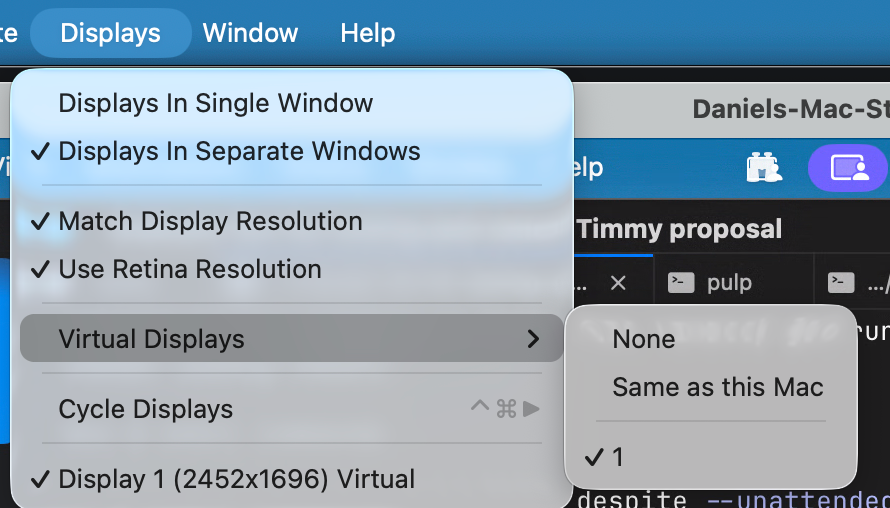
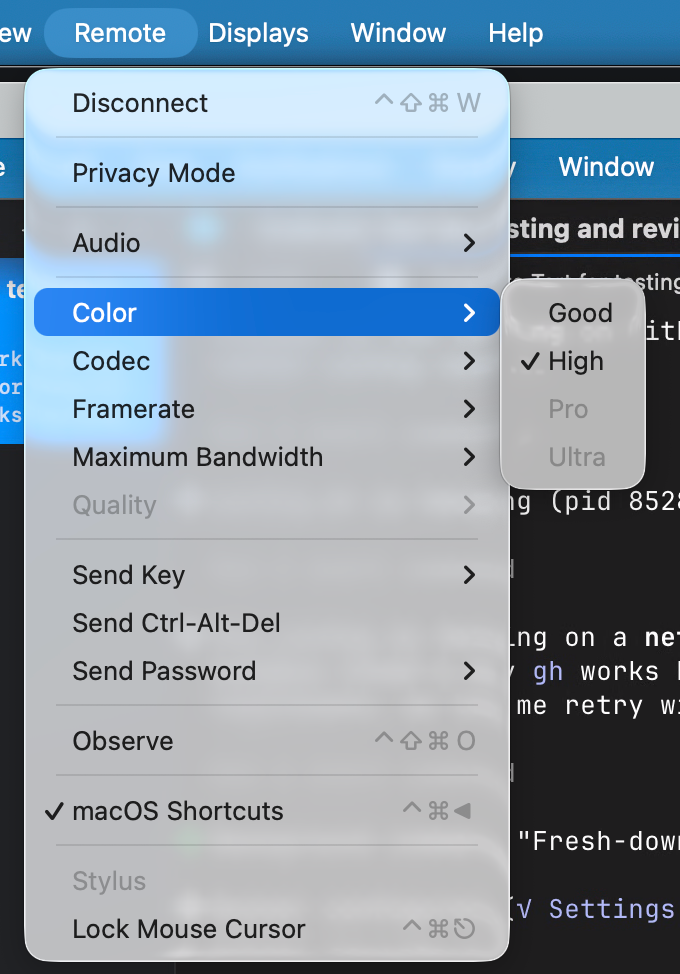
The thing I came for works exactly how I wanted: when I’m focused on the remote machine, Command+Tab behaves naturally without requiring alternate hotkeys or extra mental overhead.
I also discovered an unexpected benefit. When using tools like Wispr Flow or Muesli for voice-to-text, text gets inserted directly into fields on the remote machine. That’s something I’ve never had work through Apple Remote Desktop. Small detail, but it ends up mattering because it’s increasingly how I interact with my computers.
Jump Desktop’s Fluid 2.0 protocol seems to be doing a lot of heavy lifting here. Whatever engineering has gone into it is noticeable in day-to-day use.
The desktop client ended up being well worth the purchase. The mobile version works fine, although I’m not sure I’d buy it again if I were starting over. I think I could still use Remoter there.
There are still a few things Apple Remote Desktop does better.
The biggest one for me is drag-and-drop file transfer. Being able to grab a file from one machine and drop it onto another is surprisingly convenient. Jump Desktop can share folders between local and remote systems, which solves the problem technically, but it isn’t quite as frictionless. My understanding is that direct drag-and-drop support is coming to Jump Desktop soon.
I’ve also run into a few oddities when both applications are open simultaneously. Occasionally the mouse cursor disappears or behaves strangely, so I’ve mostly settled on using one or the other, not both at the same time. While I'm trying to make the switch to a new VNC client it's easy to forget and leave both open.
What’s interesting is that I don’t actually remote into machines as often as I used to. Most of my systems are increasingly automated, and many tasks can be handled through SSH, web interfaces, third party clients like Claude /remotecontrol or background services. When I do need a desktop session, though, it’s usually because I need to move quickly between applications, inspect something visually, or interact with a tool that isn’t exposed elsewhere.
That’s where Jump Desktop has started to win me over.
My muscle memory still reaches for Apple Remote Desktop first. Years of habit are hard to undo and it does have some handy features. But increasingly I’m finding myself opening Jump Desktop instead. The Command+Tab support, better handling of modern input workflows, and generally smoother remote experience align more closely with how I work today.
The one feature that still pulls me back toward Apple Remote Desktop is drag-and-drop. Beyond that, it increasingly feels like a product that hasn’t evolved much in a long time. Some of the limitations, particularly around keyboard handling, may very well exist for security or privacy reasons, but whatever the motivation, they end up getting in the way of how I want to work.
For now, I’m using both. If Jump Desktop closes the drag-and-drop gap, though, I suspect the balance shifts even further in its favor.