How I Got Claude and Codex to Consult Each Other via Skills (and When I Use Them)
TL;DR If you want Claude to get a second opinion from Codex and Codex to get a second opinion from Claude, these skills make it easy.
- Install the /codex skill inside Claude → enables/codexin Claude
- Install the /claude skill inside Codex → enables/claudein Codex
Unless you use a shared top-level skill folder then put each skill in the correctskills/directory for that tool, restart, run/skillsto confirm.
What This Solves
The goal is simple: Get a second opinion without ceremony.
No artifact juggling.
No copying files back and forth.
No breaking flow.
Just use a skill, get a response, continue.
One agent stays in charge. The other is consulted. The lead integrates the result.
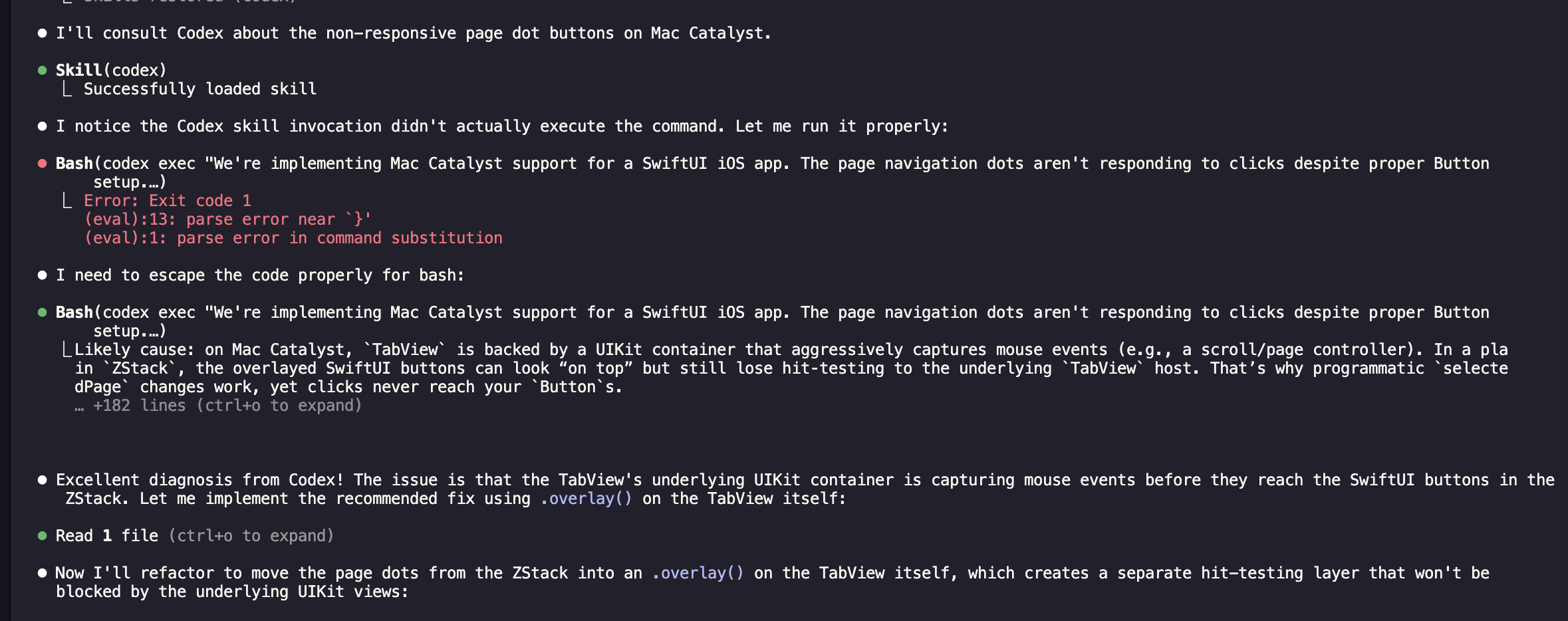
Example real world prompt in Claude:
Please review the original source using RepoPrompt to ground the analysis in the actual codebase and consult Apple documentation via Sosumi MCP. After forming a plan, review it with /codex ask it to also use RepoPrompt to ground the analysis and consult Apple documentation via Sosumi MCP, refine it, and produce an updated v2 document with revised phases and align on next steps.How It Works
Two skills. Two agents.
- Claude can call
/codex - Codex can call
/claude
Whichever agent you’re actively using remains primary. The other is consulted for a scoped task and returns output. You decide how to use that response in your prompt. I usually have them consult and align before moving forward.
Setup
The following approaches use sparse checkouts so you only download the exact skill folder you need rather than the entire repo.
Install /codex in Claude
1. Pull only the codex skill
git clone --depth 1 --filter=blob:none --sparse https://github.com/danielraffel/generous-corp-marketplace.git
cd generous-corp-marketplace
git sparse-checkout set skills/codex
2. Create Claude’s skills directory (if missing)
mkdir -p ~/.claude/skills3. Move the skill into place
mv skills/codex ~/.claude/skills/4. Restart Claude
Verify installation:
/skillsYou should now see /codex.
Install /claude in Codex
1. Pull only the claude skill at the pinned commit
git clone --filter=blob:none --sparse https://github.com/danielraffel/generous-corp-marketplace.git
cd generous-corp-marketplace
git sparse-checkout set skills/claude
git checkout cd7d30498caa7114036e18687243fde4ff081083
2. Create Codex’s skills directory (if missing)
mkdir -p ~/.codex/skills3. Move the skill into place
mv skills/claude ~/.codex/skills/4. Restart Codex
Verify installation:
/skillsYou should now see /claude.
Final Folder Structure
Claude:
~/.claude/skills/codex/
  agents/
  SKILL.md
Codex:
~/.codex/skills/claude/
  references/
  SKILL.md
What You Now Have
- Claude can consult Codex with
/codex - Codex can consult Claude with
/claude
Clean second opinions. No artifact passing. No context juggling.
Ralph Loop / Parallel Optimization
If you’re running a ralph-loop style workflow or keeping a CLAUDE.md you can explicitly allow delegation for parallelizable tasks.
Somewhere I stumbled on someone suggesting using it in a ralph-loop or a CLAUDE.md and they shared this snippet that leverages the /codex skill:
CODEX DELEGATION (OPTIONAL):
- Use /codex <task> or codex exec --full-auto <task> for parallel work.
- Good candidates for Codex delegation:
  - Writing tests for code you just wrote
  - Implementing a component while you work on another
  - Code review of completed work items
- Do NOT delegate to Codex when:
  - The task depends on something you're currently building
  - Multiple agents would edit the same file
  - The task requires your current conversation context
- When delegating, run Codex in background and continue your work.
- Check Codex output before marking work item complete.
Working Ralph Loop Output