A Tool for Generating HTML Embeds for asciicinema
TL;DR: Embedding trimmed asciinema recordings in Ghost was a little too manual, so I built a tiny tool that lets you set start/end clip times, pick a cover image (shown on the player before playback), choose a fallback image (for email/RSS clients that can’t run JS), and then generates the exact Ghost code injection + HTML card snippet you can paste in.
Why asciinema (instead of video)?
I wanted to share a screen capture of a terminal project I’ve been working on—and I wanted something better than a blurry screen recording.
asciinema records terminal sessions as lightweight text-based “cast” files (.cast) that you can replay and embed on the web. Because it’s text (not pixels):
- files stay small
- rendering stays crisp at any resolution
- viewers can copy/paste commands directly from playback
What I liked most: I can record once, then re-embed the same session at different sizes in docs, blog posts, and READMEs without re-encoding video.
The basic workflow
- Record a terminal session with asciinema
- Host the
.castsomewhere public (I used GitHub) - Embed it in Ghost using the asciinema player
- Trim to “just the good bit” (optional, but usually what you want)
- Add a cover image for the web player and a fallback image for email/RSS
Install asciinema
Install it however you like—package manager is easiest:
- macOS:
brew install asciinema - Debian/Ubuntu:
sudo apt install asciinema - Arch:
sudo pacman -S asciinema
Record a terminal session
Start recording:
asciinema rec demo.cast
Stop by exiting your shell (Ctrl+D) or typing exit.
Replay locally to sanity-check:
asciinema play demo.cast
Host your .cast files
You have two options:
- Upload to asciinema’s hosted service (
asciinema upload …) - Self-host
.castanywhere public (S3, static hosting, GitHub, etc.)
I went with: commit .cast files to a GitHub repo, then use GitHub raw URLs for embeds. That gives Ghost (and the player) a URL it can fetch directly.
Embedding in Ghost
To embed a .cast on your site, you include asciinema player (CSS + JS) and point it at your .cast URL.
In Ghost that usually means:
- Header injection: include player CSS
- Footer injection: include player JS (and init code)
- In the post body: an HTML card containing a container element for the player
One practical detail: if you send Ghost posts as newsletters (or rely on RSS), JavaScript often won’t run in those clients. I learned this the hard way. You’ll want two “previews”:
- Cover image (web): shown on top of the player before someone hits play
- Fallback image (email/RSS): a plain
<img>that still looks good even when scripts are stripped
Trimming to “just the good bit”
Usually you don’t want the full unedited recording—you want the segment that demonstrates the feature. Two approaches:
Option A: Start mid-way (easy)
The player supports startAt, so you can begin playback at a specific timestamp.
Option B: True trimming (precise, but fiddly)
A .cast is newline-delimited JSON: one header line, then timestamped events. If you cut time ranges out, you generally need to adjust timestamps to keep playback consistent.
What I was doing manually (and got tired of)
My first pass looked like:
- upload
.castfiles to GitHub - grab raw URLs
- hunt for start/end times
- hand-assemble:
- Ghost header/footer injections
- the per-clip embed HTML
- a nice preview image
- an email-safe fallback
It worked, but it was repetitive enough that I didn’t want to ever do that again.
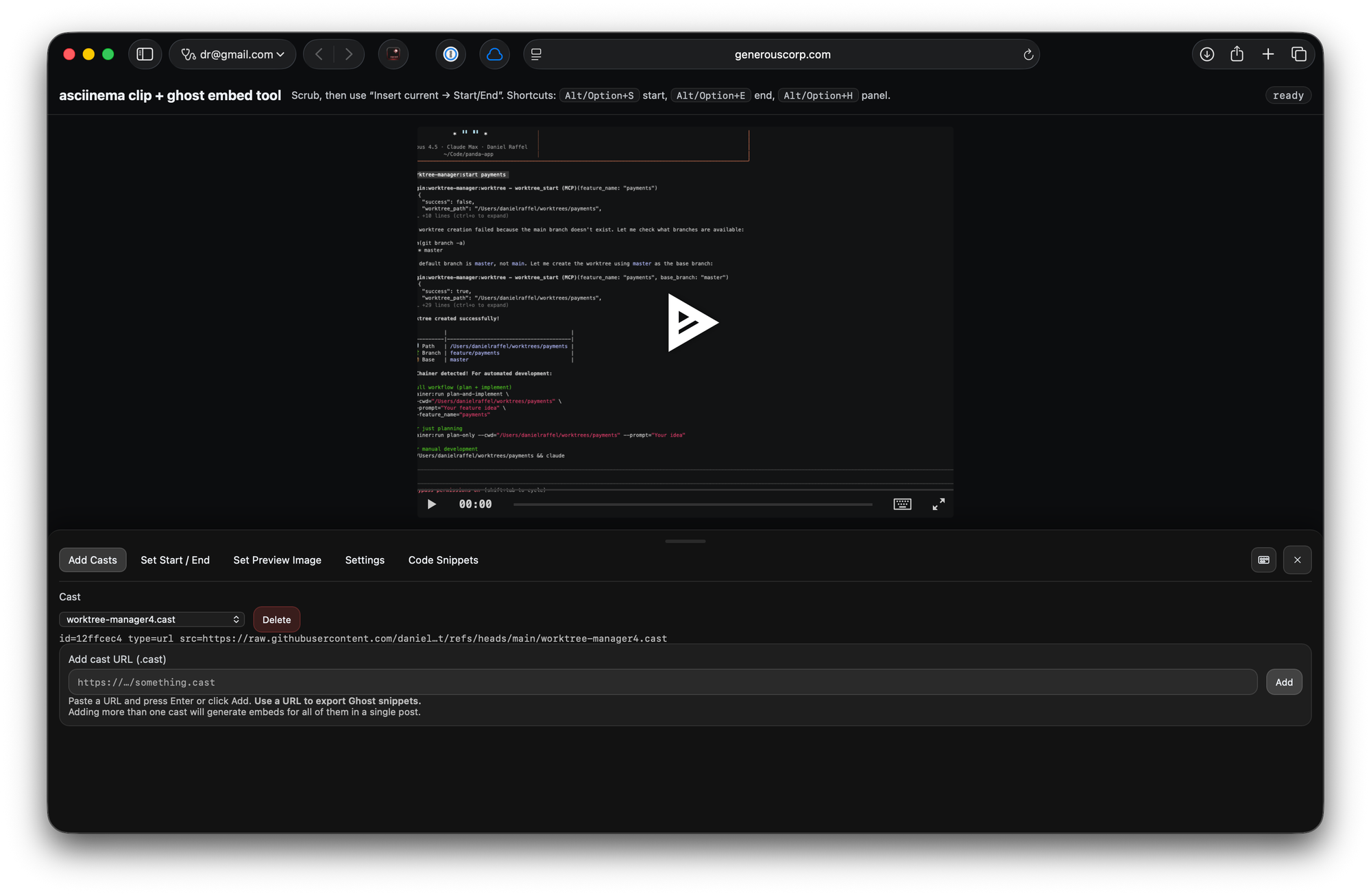
The tiny tool I built: asciinema-ghost
So I built a simple single-file tool that does the “scrub → clip → embed” loop for me.
It lets you:
- Load one or more
.castfiles (drag/drop or URL) - Scrub the timeline and stamp the current playhead into Start / End
- Preview the selection, loop it, and use markers
- Pick a frame as a cover image (web player poster)
- Set a fallback image for email/RSS
- Generate copy/paste-ready Ghost snippets (header injection, footer injection, and HTML-card embeds)
- Save state locally + export/import a project JSON
Local files are great for previewing, but final embeds want publicly hosted .cast URLs (GitHub raw URLs work well). Also: when running locally, browsers can be weird about file:// + fetching assets, so using a tiny local server makes things more consistent.
Web app: https://www.generouscorp.com/asciicinema-ghost/
Source repo: https://github.com/danielraffel/asciicinema-ghost
Examples in the wild
Here’s a post where I’m using this approach for embedded terminal demos.
Takeaways
If you want terminal demos that are crisp, lightweight, copy/paste-able, and easy to embed, asciinema is a great default.
And if you’re on Ghost (or anything that supports code injection), “self-host casts + embed with asciinema player” is straightforward—especially once you have a repeatable way to clip segments, pick a cover image, and include an email-safe fallback.
Structure (what’s happening)
For each embed you want:
- HTML card includes a container
<div>with:- an
<img>= fallback (works in email/RSS/no-JS) - a child
<div>where the web player mounts
- an
- Header injection loads the player CSS
- Footer injection:
- mounts
AsciinemaPlayerinto the mount div - hides the fallback
<img>once the player is ready - overlays a cover image (poster) on the player until playback starts
- mounts
Post Content (HTML card)
<div id="cast-f60227d3" class="cast-embed">
  <!-- Fallback image (email/RSS/no-JS) -->
  <img
    class="cast-fallback"
    src="https://raw.githubusercontent.com/danielraffel/asciicinema-output/refs/heads/main/worktree-manager4.png"
    alt="worktree-manager4.cast"
    style="max-width: 100%; height: auto; border: 1px solid #ddd; border-radius: 4px;"
  />

  <!-- Web player mounts here -->
  <div class="cast-player"></div>
</div>

<div style="height:16px"></div>

<div id="cast-899ead17" class="cast-embed">
  <!-- Fallback image (email/RSS/no-JS) -->
  <img
    class="cast-fallback"
    src="https://raw.githubusercontent.com/danielraffel/asciicinema-output/refs/heads/main/worktree-manager6.png"
    alt="worktree-manager6.cast"
    style="max-width: 100%; height: auto; border: 1px solid #ddd; border-radius: 4px;"
  />

  <!-- Web player mounts here -->
  <div class="cast-player"></div>
</div>
Post Header Injection
<link rel="stylesheet" href="https://cdn.jsdelivr.net/npm/asciinema-player@3.14.0/dist/bundle/asciinema-player.css">
Post Footer Injection
<script src="https://cdn.jsdelivr.net/npm/asciinema-player@3.14.0/dist/bundle/asciinema-player.min.js"></script>
<script>
(function () {
  if (!window.AsciinemaPlayer) return;

  function ensurePoster(rootEl, posterUrl) {
    if (!posterUrl) return null;

    var playerEl = rootEl.querySelector(".ap-player");
    if (!playerEl) return null;

    var posterEl = playerEl.querySelector(".ap-preview-poster");
    if (!posterEl) {
      posterEl = document.createElement("img");
      posterEl.className = "ap-preview-poster";
      posterEl.alt = "Cover image";
      posterEl.style.position = "absolute";
      posterEl.style.inset = "0";
      posterEl.style.width = "100%";
      posterEl.style.height = "100%";
      posterEl.style.objectFit = "cover";
      posterEl.style.zIndex = "2";
      posterEl.style.pointerEvents = "none";
      playerEl.appendChild(posterEl);
    }
    posterEl.src = posterUrl;
    return posterEl;
  }

  function clearPoster(rootEl) {
    var posterEl = rootEl.querySelector(".ap-preview-poster");
    if (posterEl) posterEl.remove();
  }

  function initCast(rootId, castUrl, startAt, endAt, posterUrl) {
    var rootEl = document.getElementById(rootId);
    if (!rootEl) return;

    var fallbackImg = rootEl.querySelector(".cast-fallback");
    var mountEl = rootEl.querySelector(".cast-player");
    if (!mountEl) return;

    var opts = {
      startAt: startAt,
      controls: "auto",
      markers: [[startAt, "Start"], [endAt, "End"]]
    };

    var player = AsciinemaPlayer.create(castUrl, mountEl, opts);

    // When the player is ready on the web: hide fallback + show cover overlay
    var onReady = function () {
      if (fallbackImg) fallbackImg.style.display = "none";
      ensurePoster(rootEl, posterUrl || (fallbackImg && fallbackImg.src));
    };
    player.addEventListener("ready", onReady);

    // Remove cover once playback starts
    var onPlay = function () { clearPoster(rootEl); };
    player.addEventListener("play", onPlay);
    player.addEventListener("playing", onPlay);
  }

  initCast(
    "cast-f60227d3",
    "https://raw.githubusercontent.com/danielraffel/asciicinema-output/refs/heads/main/worktree-manager4.cast",
    9.56,
    36.84,
    "https://raw.githubusercontent.com/danielraffel/asciicinema-output/refs/heads/main/worktree-manager4.png"
  );

  initCast(
    "cast-899ead17",
    "https://raw.githubusercontent.com/danielraffel/asciicinema-output/refs/heads/main/worktree-manager6.cast",
    7.40,
    576.31,
    "https://raw.githubusercontent.com/danielraffel/asciicinema-output/refs/heads/main/worktree-manager6.png"
  );
})();
</script>